
When working with MetaTrader 5 charts, it is important not only to see the price movement, but also to understandhow much time is left before a new candle is formed.
This is especially true for strategies that use closing a candlestick as a confirmation of a trading signal.While the current candle is still forming, its appearance can change significantly: the body increases, shadows appear and disappear, and the preliminary signal may eventually turn out to be false.
Candle Timer Indicator for MT5solves this problem quite simply: it displays the countdown to the close of the current candle directly on the chart. This allows the trader to understand how much time is left before the end of the selected period.
What is Candle Timer Indicator
Candle Timer is an auxiliary indicator for MetaTrader 5 that shows the remaining time before the current bar closes.
Hedoes not generate buy or sell signals and does not analyze the direction of the market. His task is much easier — to give the trader accurate information about the time of candlestick formation.
For example, if the hourly chart H1 is open, the indicator shows how much time is left before the end of the current hourly bar. On M5, it will count down to the close of the five-minute candle, while on other timeframes the principle remains the same.
This is especially convenient when the trading strategy involves making a decision after the candle is closed.
Why do you need a candle timer
At first glance, it may seem that information about the time before the bar closes does not matter much. However, in many trading approaches, the moment of closing the candlestick is part of the trading decision itself.
For example, a trader can wait for:
confirmation of level breakdown;
forming a candlestick pattern;
closing the candle above or below a certain level;
confirmation of movement after the release of economic statistics;
completing the current bar before opening the position.
Until the candle is closed, the final result is still unknown. Therefore, the timer helps to separateforming signal from already confirmed movement.
That is why such a tool can be useful for both scalpers and intraday traders working with Price Action and other methods of technical analysis.
How the indicator looks on the chart
After installing the Candle Timer on the chart, the time remaining until it closes appears next to the current candle.
For example, on an hourly chart, the value of3:39means that 3 minutes 39 seconds remain until the end of the current H1 candlestick.
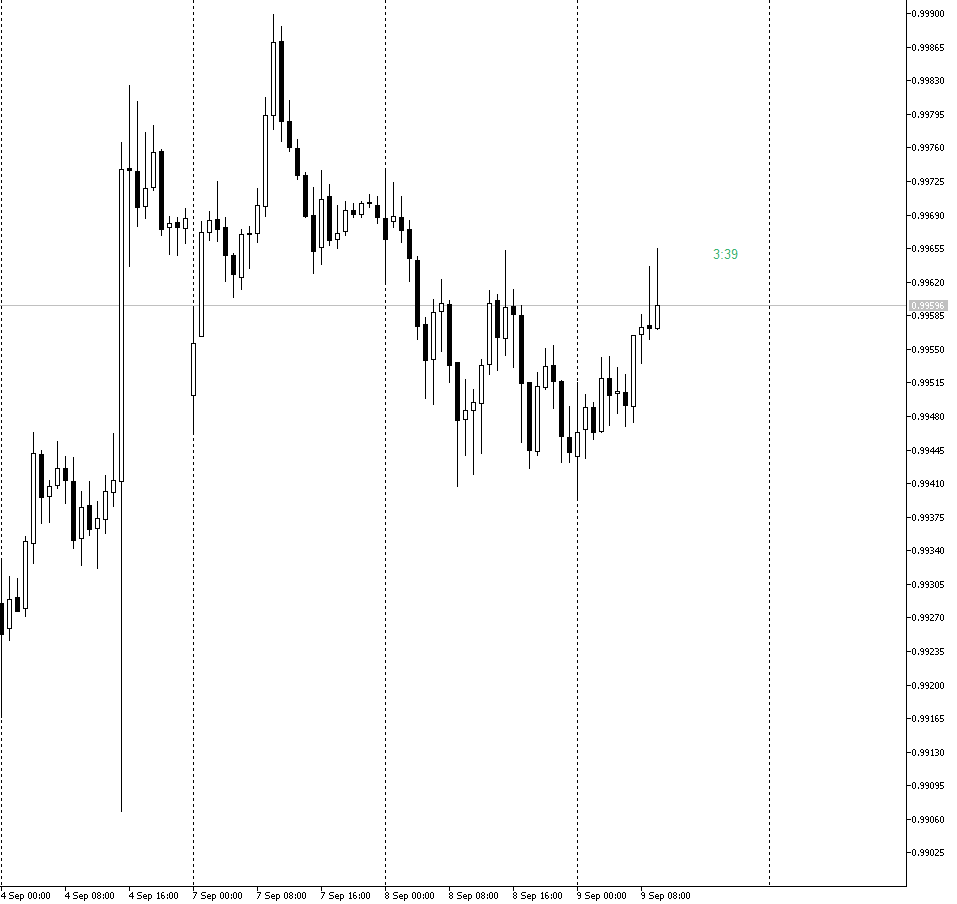
The Candle Timer Indicator for MT5 shows the remaining time before the current candle closes.
This allows you to quickly assess the situation directly during the trade, without calculating the end time of the bar manually.
Candle Timer Basic Parameters
The indicator remains quite simple, but its display can be adapted to your own schedule.
The following parameters are available in the settings:
Color for positive timer values— timer color when the countdown is in a positive value.
Color for negative timer values— display color after the end of the main period.
Font size for timer— timer font size.
Timer shift— offset of the timer relative to the current candle.
In practice, this allows you to choose the size and location of the indicator so that it does not overlap candles and other elements of technical analysis.
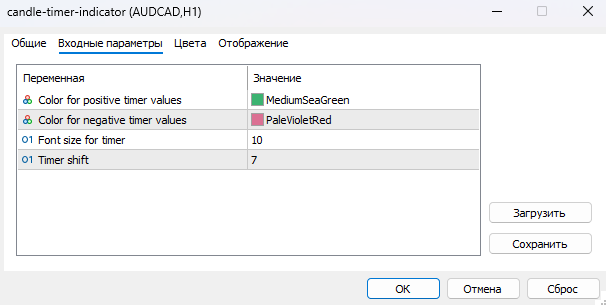
Basic settings of the Candle Timer Indicator in MetaTrader 5.
How to use Candle Timer in trading
The timer itself is not a trading strategy. It is more correctly considered asoptional time control tool.
Confirm Candlestick Patterns
If the strategy is based on candlestick models, it is important to wait until the candlestick is completed.
For example, in the process of forming, a candlestick may look like a strong Pin Bar, but a few seconds before closing, the price is able to go back and completely change the pattern structure.
The timer allows you to see how much time is left before the candle shape becomes final.
Breakdown of levels
When working with support and resistance, it is also important to consider the closing of the bar.
The price may temporarily go out of the tier, but then go back. Therefore, some traders use the close of the candlestick above or below the level as an additional confirmation of the breakout.
Candle Timer helps to control this moment and not make a decision too early.
Scalping & Short Time Frames
On M1, M5, or M15, a few seconds can be noticeable.
The timer allows you to understand in advance when the current candle will end and when the new bar will start. This is convenient when preparing to enter or exit a position.
At the same time, the indicator does not replace the analysis of price, volume, levels or news background — it only adds another element of information to the trading chart.
Use before releasing important news
Separately, the timer may be useful during the publication of macroeconomic statistics.
After the release of important data, the price is able to move sharply in both directions In such a situation, the trader can use the time until the candlestick closes as an additional reference point so as not to react exclusively to the first seconds of the movement.
However, it is especially important to take into account the risk of high volatility: the mere fact of closing the candlestick does not make the transaction safe and does not confirm the direction of the market
Where to download Candle Timer Indicator for MT5
If you want to test the indicator yourself, you can download and install it in MetaTrader 5.
DOWNLOAD CANDLE TIMER INDICATOR FOR MT5
After downloading, the file must be installed in the MetaTrader 5 indicator directory.
Before using on a live account, it is recommended to first check the operation of the tool on the demo account and make sure that it is displayed correctly on the selected timeframe.
How to install Candle Timer in MetaTrader 5
The installation of the indicator takes place in the standard way.
OpenMetaTrader 5.
From the top menu, select"File" → "Open Data Directory".
Go to folderMQL5 → Indicators.
Place the Candle Timer file in this folder.
Restart MetaTrader 5 or refresh the list of indicators.
Open the windowYandex.Navigator.
Find Candle Timer in the Indicators section.
Drag it to the desired graph.
If necessary, adjust the color, font size, and timer position.
After that, the countdown will appear directly on the chart.
On which timeframes can the indicator be used
Candle Timer can be used on different MetaTrader 5 timeframes.
For short periods, it can be especially convenient for scalping and intraday trading. On larger timeframes, the timer helps to control the closing moment of the candle when analyzing levels, trends and candlestick formations.
When switching from one timeframe to another, the time until the current bar closes automatically changes according to the selected period.
Practice is more important than theory
Candle Timer is a simple tool, but its usefulness is best assessed directly on the chart and within its own trading system.
You can first test it on a demo account, see how convenient the timer location is, and check whether it helps to comply with the rules of the strategy.
Trade and practice with Avora Markets
This approach allows you to first understand the tool in practice and only then decide on its use in real trading.
Advantages and limitations of Candle Timer
The main advantage of the indicator is simplicity.
It does not overload the graph with additional lines, arrows or complex signals, but shows only one information —how much time is left before the candle closes.
However, it has an important limitation: Candle Timerdoes not predict the price.
It does not show the direction of the next movement, does not determine the entry and exit points and does not replace a full-fledged trading strategy.
Its task is to help the trader take into account the time of bar formation when making trading decisions.
Summary
Candle Timer Indicator for MT5 is a simple auxiliary tool for monitoring the time until the current candle closes.
It can be useful when working with candlestick patterns, levels, breakouts, scalping and intraday strategies, where the moment of closing the bar matters.
The basic idea of the tool is simple:do not forget that an unclosed candle can still completely change its shape.
Therefore, the timer can be a useful addition to technical analysis, especially if the trading system involves confirming signals after the candlestick is closed.